
Quick Character Sheet
The Quick Character Sheet is a slide-in panel that appears on the right side of the screen when you select a character token. It gives you a focused view of a character’s stats without leaving the map, and lets you edit wounds and strain directly from the panel. Click a token, adjust its wounds, and keep going.
Enabling the Character Sheet
Section titled “Enabling the Character Sheet”The feature is off by default. To turn it on:
- Open the Settings panel (gear icon in the bottom-left)
- Under the General tab, check Quick Character Sheet (BETA)
This is a local preference. It only affects your view. Other players at the table can independently enable or disable it without affecting each other.
Using the Panel
Section titled “Using the Panel”Once enabled, select any character token on the map. The panel slides in from the right edge showing:
- Character portrait pulled from the character’s profile image
- Character name and role badge (Player or NPC)
- Wounds with current value, threshold, and a progress bar
- Strain with current value, threshold, and a progress bar
- Defense values for melee and ranged
- Minion counter (for minion groups only)
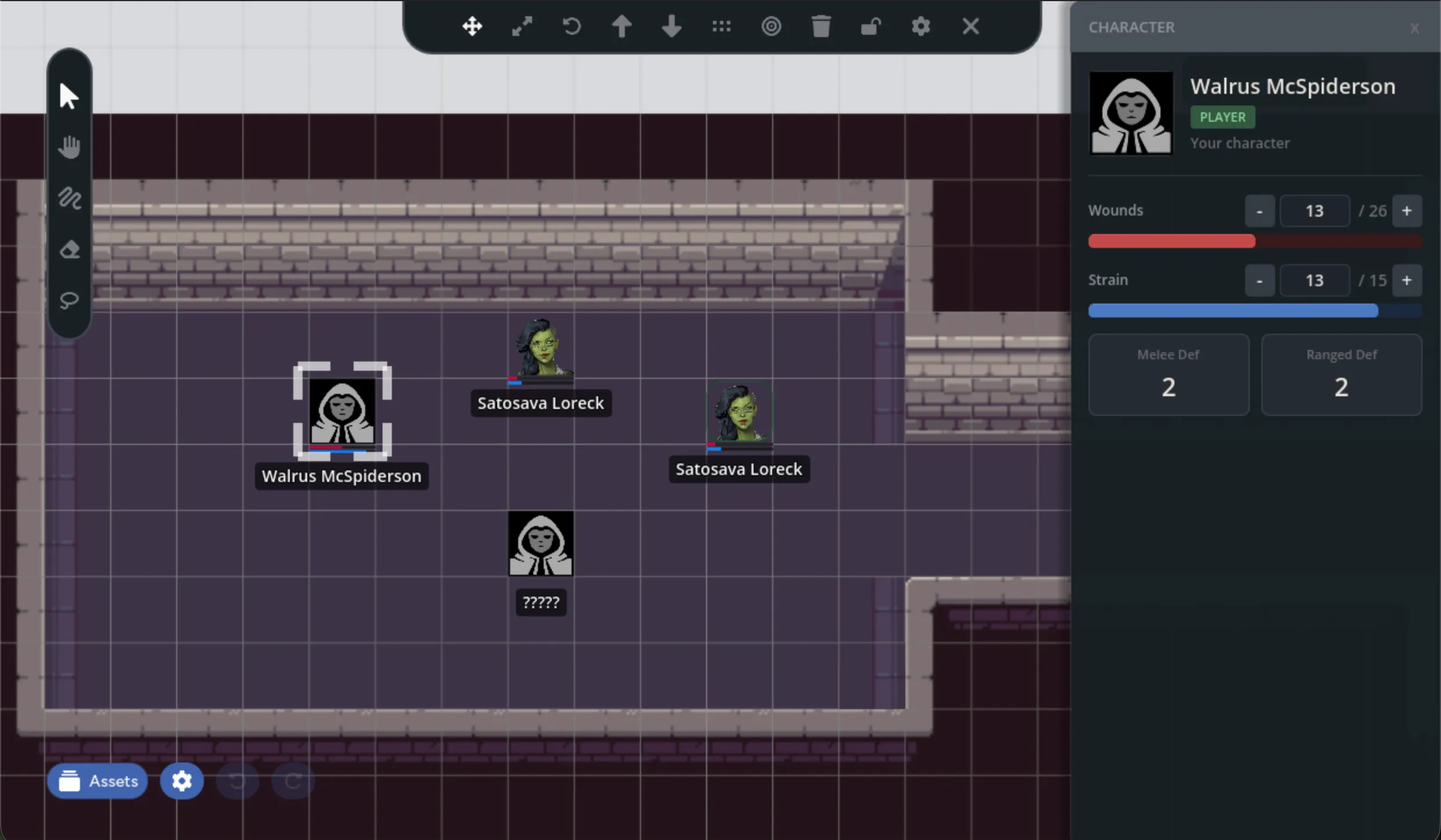
To close the panel, click the x button in the top-right corner, click on empty space on the map to deselect the token, or select a non-character asset.
Editing Wounds and Strain
Section titled “Editing Wounds and Strain”If you have permission to edit a character (see Who Can Edit below), the wounds and strain rows show edit controls instead of read-only values:
- [-] and [+] buttons: Step the value down or up by 1
- Direct input: Click the number field, type a new value, and press Enter
Changes sync immediately to the token’s health bars, the web character sheet, and every other player at the table.
Rapid Edits
Section titled “Rapid Edits”If you click [+] or [-] several times quickly, the panel batches your changes. It waits briefly after you stop clicking, then saves the final value to the database in a single write. This keeps the interface responsive even when applying large amounts of damage.
Who Can Edit
Section titled “Who Can Edit”Not everyone can modify stats through the panel:
| You are… | Your own character | Other players’ characters | NPCs |
|---|---|---|---|
| Player | Can edit | View only | View only |
| GM | Can edit | View only | Can edit |
- Players can always edit their own character’s wounds and strain
- GMs can edit any NPC’s wounds and strain, but not player characters (to avoid accidentally changing a player’s stats)
- Everyone else sees read-only values
When you don’t have edit permission, the panel shows the stat values as plain text instead of the stepper controls.
Visibility Rules
Section titled “Visibility Rules”The panel respects the same visibility levels as character tokens. What you see in the panel depends on the character’s visibility setting:
| Visibility Level | What the Panel Shows |
|---|---|
| Complete | Full stats, portrait, and name |
| Known | Name and portrait only, with “Stats hidden” notice |
| Visible | Name shows as ”?????” with no other details |
| GM-only | Panel doesn’t open for players |
GMs always see full information regardless of visibility settings.
Minion Groups
Section titled “Minion Groups”When you select a minion group token, the panel shows an additional section below the defense values with the current minion count:
3 / 5 alive
The wounds and strain bars scale to the group’s total capacity. A group of 5 minions with wound threshold 5 shows wounds out of 25.
As you increase wounds through the panel, the minion counter updates to match.
Real-time Updates
Section titled “Real-time Updates”The panel stays current with changes from any source, you never need to close and reopen the panel to see fresh data. If someone else edits the same character you’re viewing, their changes appear immediately.
Related Features
Section titled “Related Features”- Character Tokens: How tokens link to characters and display stats on the map
- GM Controls: Visibility settings and other GM-only features